Mountable S3 Without a Rewrite: Using AWS S3 Files to Retire Brittle NFS/EFS Glue Code
Storage semantics routinely derail modernization: apps want POSIX-style files, but cloud economics and durability point to object storage. AWS S3 Files—announced this past week—aims to close that gap by enabling file system-style access to S3 buckets, offering teams a new path to reduce sync layers, simplify data access, and modernize incrementally without reworking app I/O.
Modernization programs rarely fail because of compute. They stall because of storage.
If you’ve ever tried to move a legacy service off a shared NFS mount (or an EFS-backed “just make it work” volume) into a more cloud-native architecture, you’ve probably discovered the uncomfortable truth: the hardest part isn’t getting containers to run—it’s untangling decades of file-path assumptions.
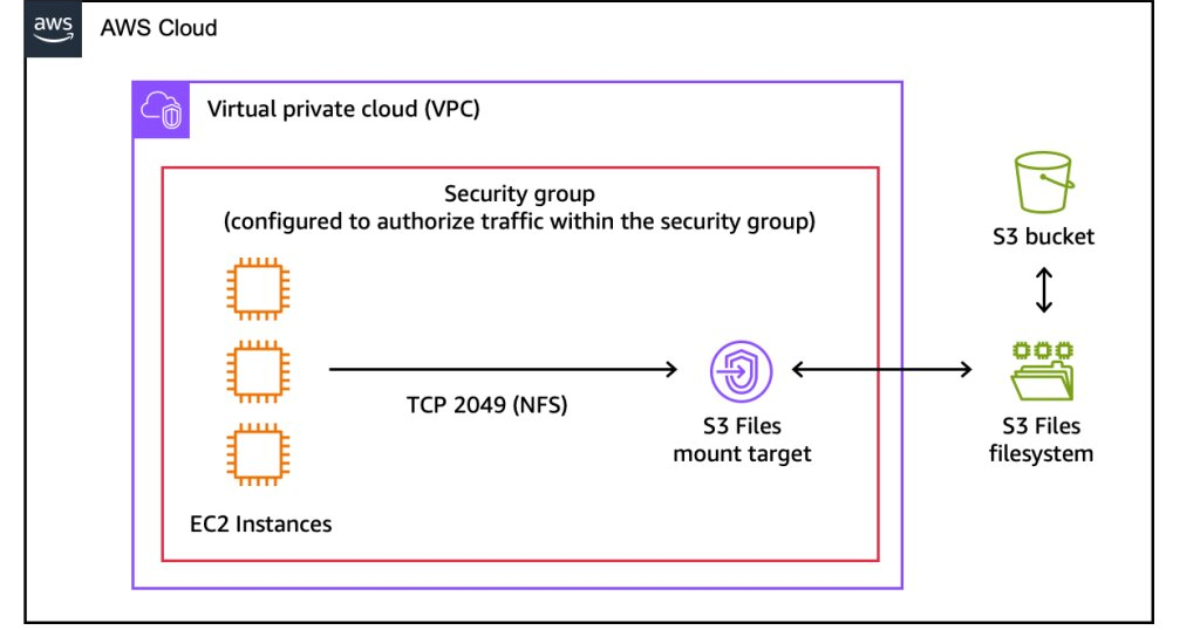
AWS’s newly announced S3 Files is interesting precisely because it targets that pain. As reported by InfoQ in “AWS Introduces S3 Files, Bringing File System Access to S3 Buckets”, AWS introduced a capability that enables users to mount an Amazon S3 bucket for file system-style access—positioned as a way to access object storage through a file interface. And importantly for teams planning roadmaps right now: this is a new AWS storage capability announced in the past week.
Context: Why “object vs. file” becomes the modernization bottleneck
Most modernization initiatives have a straightforward trajectory:
- Lift and shift the VM into a more managed runtime.
- Replace bespoke deploy scripts with pipelines.
- Incrementally carve out services.
Then you hit the storage wall.
The legacy reality: file paths as an API
In many codebases, the “API” for data is not a service call—it’s a filename.
- Batch jobs iterate over directories (e.g.,
/exports/incoming/*.csv). - Multiple services coordinate through shared files (“drop a marker file when done”).
- Plugins expect
open()/read()semantics and can’t be changed. - Third-party software assumes a mounted filesystem and will never speak S3.
These patterns are fragile, but they’re also deeply embedded. Rewriting them can be risky, expensive, and slow—especially when you need to keep the lights on.
The cloud reality: object storage wins (until your app needs files)
S3 is attractive because it’s durable, scalable, and operationally simpler than managing a shared filesystem with performance tuning, mount options, failover behaviors, and capacity planning.
But it’s different:
- Object names aren’t directories (even if the console makes them look like it).
- Atomic rename, file locks, and directory semantics don’t map cleanly.
- Latency and consistency expectations may differ from NFS workloads.
As a result, many teams end up with “glue code” to bridge these models.
The glue code you want to retire
Before a mountable S3 option, organizations commonly used one (or several) of these patterns:
1) NFS/EFS as a long-term crutch
You move compute to the cloud but keep EFS (or self-managed NFS) so the app doesn’t have to change. That can be pragmatic—but it often becomes permanent.
Common outcomes:
- Latency surprises for chatty workloads.
- Complicated mount lifecycle management across ephemeral hosts.
- Performance tuning that no one remembers how to do.
- “It works until it doesn’t” outages tied to mount stability, DNS, or client behavior.
2) Bidirectional sync layers (the technical debt factory)
Teams implement:
- Agents that sync NFS ↔ S3 on a schedule.
- Event-driven pipelines that mirror writes into S3.
- Dual-write logic plus reconciliation jobs.
This is where operational simplicity goes to die:
- Race conditions and partial syncs.
- Duplicate copies and unexpected storage costs.
- The hardest category of bugs: “it depends on timing.”
3) Partial rewrites that stop halfway
Some applications get updated to read from S3, but ancillary tools still expect files. You end up supporting both, which can be worse than supporting one.
What AWS S3 Files changes (and what it doesn’t)
Per InfoQ’s coverage, S3 Files brings file system access to S3 buckets and is explicitly positioned as a way to access object storage through a file interface. The key promise for modernization teams is conceptual: keep S3 as your durable backing store, while presenting a file-like access path to software that isn’t ready for object APIs.
A modernization pattern: “mount first, refactor later”
For maintenance and upgrade programs, the most valuable pattern is often:
- Stabilize the system (reduce moving parts).
- Create an abstraction boundary (so future work is isolated).
- Refactor behind the boundary when time and risk allow.
S3 Files fits this by potentially letting you standardize on S3 earlier—without waiting for every producer/consumer to become S3-native.
Think of it as an “access layer,” not a free semantic upgrade
Even if something is mountable, the underlying store is still object storage. Engineering teams should assume that some file system expectations may not translate perfectly.
Practical questions to ask during evaluation:
- What happens with rename-heavy workflows? Many pipelines use “write temp file, rename to final” as a commit protocol.
- Do your apps rely on file locking? Advisory locks, flock semantics, or lockfiles are common in batch ecosystems.
- How chatty is the I/O pattern? Small reads/writes and frequent metadata calls can behave differently than large sequential access.
- How do you handle partial writes and crash recovery? Your pipeline’s “transaction semantics” may depend on filesystem behavior.
The opportunity is real—but you still need to validate workload fit.
Modernization patterns enabled by mountable S3
Here are concrete ways S3 Files can reduce maintenance drag while keeping modernization incremental.
1) Retire NFS/EFS used only as an interoperability bridge
If EFS exists primarily so multiple services can “see the same files,” consider replacing that shared mount with S3 as the common substrate.
Actionable approach:
- Identify directories that function as integration points (incoming/outgoing/staging).
- Migrate those paths first—before touching the application’s core datastore.
- Keep the app’s file I/O intact while removing the shared filesystem dependency.
Benefit: fewer mount-related incidents and less time spent on filesystem tuning.
2) Consolidate “data drop” pipelines into a single durable store
Many organizations maintain:
- Local scratch disks
- Shared NFS
- A secondary S3 archive
This triple-store pattern exists because tools want files, while governance wants S3.
With S3 Files as an access path, you can try consolidating:
- S3 becomes the system of record.
- File-based consumers access via a mount.
- Native consumers use S3 APIs directly.
Benefit: fewer copies, simpler retention policies, and clearer ownership.
3) Create a clean migration boundary for legacy apps
A common modernization move is to keep the legacy app stable while modernizing everything around it.
S3 Files can act as the boundary:
- Legacy app continues reading/writing “files.”
- New services publish/consume via S3 events, S3 APIs, or data processing tools.
Benefit: you can modernize producers/consumers independently instead of coordinating a big bang rewrite.
4) Replace bespoke sync and reconciliation code with a managed interface
If your platform has a homegrown “sync daemon,” your maintenance costs are compounding:
- You own correctness.
- You own performance.
- You own weird edge cases.
A managed mountable S3 interface can be a path to deleting that code.
Benefit: less custom code to patch, monitor, and explain during incidents.
Practical implications for engineering teams
This is where CTOs and engineering leaders should get concrete: what do we do next?
Run a workload fit assessment (before you promise timelines)
Start by classifying workloads:
- Read-mostly content (static assets, reference data, model artifacts): likely good candidates.
- Write-once, read-many batch outputs: often a strong match.
- High-churn, metadata-heavy workloads (millions of small files, frequent renames, lock contention): higher risk—test carefully.
Your goal is not to prove it works in general; it’s to prove it works for your I/O shape.
Define the semantic contract your apps assume
Document assumptions your systems make today:
- Do you rely on atomic rename?
- Do you scan directories repeatedly?
- Do you expect immediate visibility after write?
- Do multiple writers update the same file?
This becomes your acceptance criteria and helps avoid the classic mistake: “It mounted, ship it.”
Plan a phased migration with a rollback
A safe rollout pattern:
- Shadow: mount S3 for read-only access in a non-prod environment.
- Canary: move one low-risk pipeline or one directory subtree.
- Dual-run (short-lived): validate outputs match.
- Cut over: make S3 the primary for that workflow.
- Delete: remove sync jobs and old mounts once stable.
Make rollback explicit: how do you revert if a workload hits a semantic edge case?
Treat it as a maintenance win, not just a cloud feature
At Vibgrate, we see storage glue code as a multiplier of maintenance cost:
- It breaks silently.
- It is hard to test.
- It is rarely owned.
If S3 Files reduces the number of bespoke components between applications and durable storage, it’s not just modernization—it’s a reliability and on-call improvement.
Operational consistency: the hidden payoff
Even when performance is “good enough,” the bigger payoff can be consistency:
- One primary data substrate (S3) instead of filesystem + object store.
- Unified IAM and auditing patterns around data access.
- More predictable backup/retention approaches.
InfoQ’s write-up frames S3 Files as bringing a file interface to S3 buckets—this kind of bridging can be particularly valuable in organizations that have been forced to choose between “cloud-native” and “compatible with reality.” Now you can aim for both, incrementally.
Conclusion: A new lever for incremental modernization
S3 Files won’t magically make every legacy filesystem workload cloud-native, and it shouldn’t be treated as permission to avoid refactoring forever. But as a newly announced AWS capability (covered by InfoQ this week), it introduces a compelling modernization lever: standardize on S3 sooner while keeping file-oriented apps running.
For teams stuck in NFS/EFS dependency loops or maintaining brittle sync layers, the forward-looking move is to pilot S3 Files where it can delete the most glue code first. If it holds up under real workload tests, it can become a cornerstone pattern: mount to stabilize today, refactor to native APIs tomorrow—on your schedule, not your storage system’s.
Source: InfoQ, AWS Introduces S3 Files, Bringing File System Access to S3 Buckets (April 2026): https://www.infoq.com/news/2026/04/aws-s3-files/?utm_campaign=infoq_content&utm_source=infoq&utm_medium=feed&utm_term=global