Your codebase has a DriftScore.
Now it’s in your editor.
Every stack drifts: runtimes reach end of life, frameworks fall majors behind, dependencies go quiet — and most teams find out during the upgrade that hurts. Vibgrate for VS Code shows the drift as you work: a DriftScore in the status bar, computed on your machine, with per-dependency detail in your manifests.
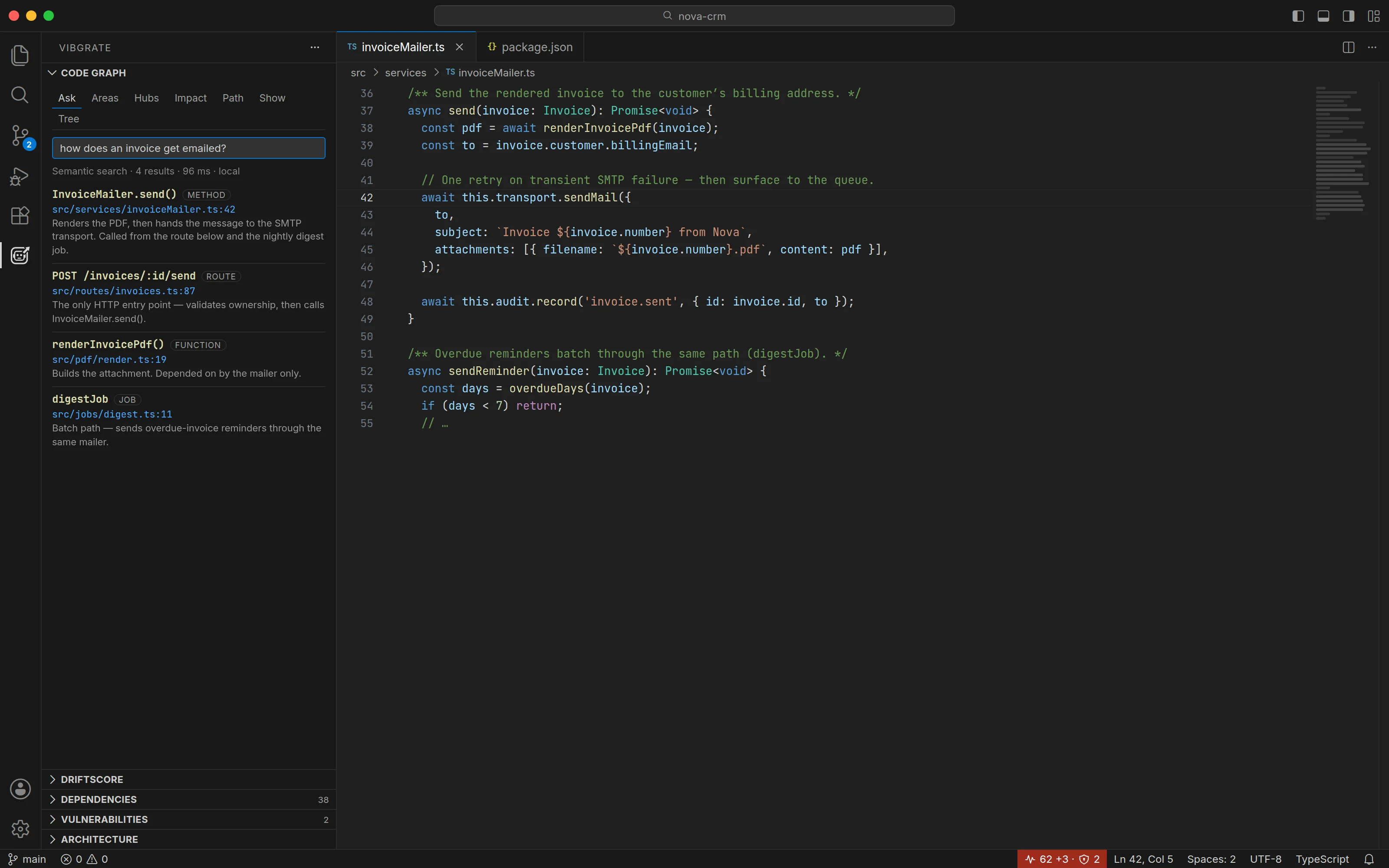
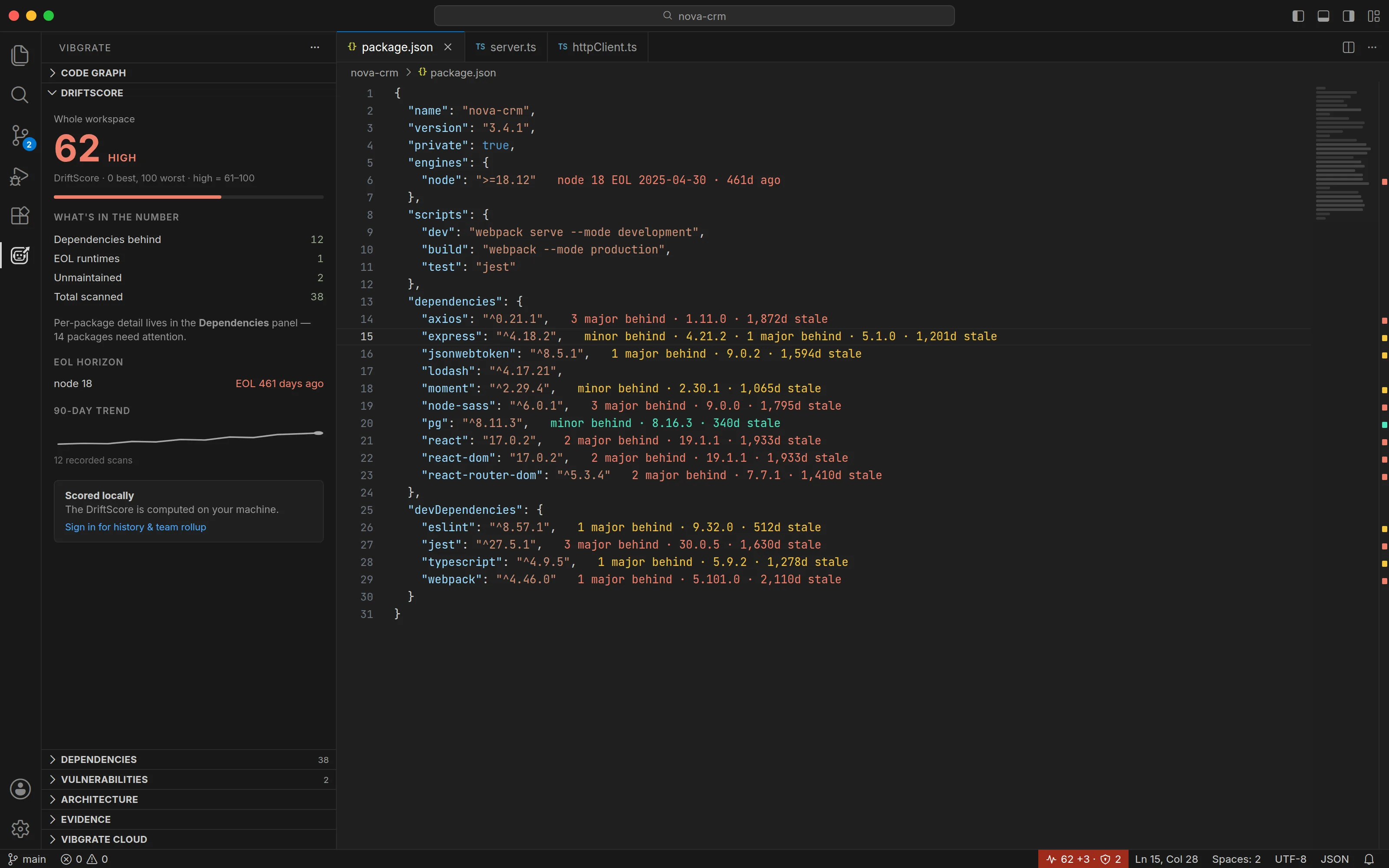
Install, open a workspace, and the score appears — overlays, panel, and status bar, computed locally.
What you see
Install the extension, open a workspace, and the score appears. Nothing to configure. All colors adapt to your theme, including light and high-contrast themes.
Status bar score
Your workspace DriftScore, colored by band, always current — computed locally as you work. Drift diff shows what changed since the last recorded scan.
Inline dependency detail
Each dependency line shows how far behind it is, the latest version, and how stale it has gone — in package.json and .csproj alike. Full, compact, or off.
Overview ruler
Colored marks in the scrollbar show the whole file’s drift at a glance, in every theme including light and high contrast.
Explorer badges
A score badge on every manifest and lockfile — each package’s own score, not the whole-workspace rollup, so monorepos stay readable.
DriftScore panel
The score, what’s in the number, real runtime EOL dates on a horizon, and a 90-day trend — scoped to the whole workspace or any one package.
Dependencies panel
The full inventory, worst first — search, filter chips, version journeys, per-package vulnerability checks, and Fix → on every row.
Vulnerabilities
A quiet advisory panel with severity filters and CISA KEV flags — plus CVE overlays on the source lines that actually reach a vulnerable package.
Hovers
Version currency, the version journey (17.x → 18.x → 19.x), majors behind, age, libyears, and license for any dependency, on hover.
Fix… routing
When you decide to act: remediation routes (Renovate, OpenRewrite, and others) ranked purely by technical fit. Vibgrate’s own tools get no special placement.
From package.json to .csproj — npm, NuGet, PyPI, Maven & Gradle, Go, Cargo, RubyGems, Composer, Pub, Hex, and Dockerfiles all scan with the same engine.
VG Code — a coding agent, in chat or the sidebar
Describe a change and VG Code works on it, grounded in your code map. It streams its thinking and edits live, and nothing touches your files until you say so. See how VG Code works.
You approve every edit, by default
In Agent mode — the default — edits and commands stream in as Approve / Reject cards with inline diffs, and every approved change writes a checkpoint you can restore with one click. Plan mode blocks writes entirely; Auto accept, if you pick it, approves its own edits and commands under a denylist and shell isolation.
Two places to use it
Type @vgcode in VS Code’s Chat view, or use the full panel that docks itself in the Secondary Side Bar next to your other agent tabs.
Local models, plainly
Pick a Code Mode — Spark, Flow, or Forge — auto-fitted to your machine, or manage models in the panel: install Ollama models with live pull progress, or browse OpenRouter’s catalogue. Keys live in VS Code’s secret storage. A local model keeps the turn on your machine; a hosted one — Vibgrate Relay, OpenRouter, or another provider you configure — receives that turn’s context. Drift scanning uploads nothing either way.
Grounded in your code map
Tasks start from a Context Capsule of exact source ranges from the graph, so the agent works from your real call sites — the same agent and governance gate as vg code in your terminal.
Local by design
Drift scanning reads manifests and lockfiles only — it does not read or upload your source code. No account, no token: the full local DriftScore works without signing in to anything.
First scan works offline
The engine is bundled with the extension, so the first scan works offline with nothing to download — including on Remote-SSH, in devcontainers, and behind a corporate proxy.
Quiet by design
No toasts, no modals, no notifications. Problems-panel diagnostics are off by default, and never at Error severity. Vibgrate measures; it does not gate your work.
Works with your AI assistant
If you use an AI coding assistant — Claude Code, Cursor, Codex, Gemini CLI, and others — the extension notices and wires Vibgrate AI Context into it in the background, the same setup as running vg install --all yourself. Your assistant answers from your code map and real dependency versions instead of guessing. It runs once per workspace, silently, and only when an assistant is actually in use — settings turn it off or remove the wiring again.
Your code map, in the panel
The extension also builds the local Vibgrate Graph in the background — the code map behind the Code Graph panel. Seven ways in: Ask plain-English questions, map Areas, find the Hubs everything leans on, trace the Impact of a change, find the Path between two symbols, Show a symbol’s wiring, or walk the Tree. Every file:line in a result is one click from your editor. Semantic search for Ask uses a small local backend and embedding model, downloaded automatically; one setting keeps queries lexical and removes the downloads.
And when you need to go deeper
Architecture
Your workspace’s detected archetype and layers — tech stack, services, and where the drift risk sits, layer by layer.
Review
Your uncommitted changes and what Vibgrate Review says about them: one decision, each finding with its evidence, every path one click from the editor. Reports change integrity, not a proof of security.
Evidence
The scan’s facts in a form you can take elsewhere — SARIF for code scanning, JSON for pipelines, Markdown for a PR comment or a ticket.
Vibgrate Cloud
Optional sign-in adds score history, trends, and team rollups. Everything else on this page works without it.
The same number everywhere
The extension renders scores computed by the Vibgrate CLI — the same engine that powers vg in your terminal. The score in your editor matches the score in your CI output and on your dashboard, because it comes from the same place.
Free and paid, plainly
Everything this extension shows — the DriftScore, inline detail, the panels, hovers, the code graph, VG Code — is free, with no account. A Vibgrate Cloud account adds score history, trends, and team rollups. Automated remediation (vg fix) is a separate paid capability; it appears in Fix… ranked on technical fit like every other route, labeled as paid, with no special placement. The score never advertises the fix.
See your DriftScore on the next file you open
Install the extension, open a workspace, and the score appears. No account. No token. Nothing to configure.
Install